
Embedded #2: COR24-RS --- Learn Assembly in Your Browser
1943 words • 10 min read • Abstract

| Resource | Link |
|---|---|
| Live Demo | COR24 Assembly Emulator |
| Source | GitHub |
| Video | Browser-Based Assembly: COR24 RISC Emulator in Rust |
| MakerLisp | makerlisp.com (COR24 creators) |
| COR24 Soft CPU | FPGA Implementation |
| COR24 Dev Board | Hardware Kit |
| Comments | Discord |
What is COR24?
COR24 (C-Oriented RISC 24-bit) is a soft CPU architecture designed by MakerLisp. The design priorities were simplicity, speed, and a good impedance match to C compilers on low-density FPGAs—no legacy requirements, no committee compromises. The “C-Oriented” in the name is literal: architectural decisions were informed by what a practical C compiler needs from this class of processor.
Origin Story
MakerLisp developed COR24 as a replacement for the eZ80, which was the best option they could find for their class of small embedded problems. During the pandemic-era chip shortage, mass-market microcontrollers became unavailable, so they designed their own CPU for FPGAs. The result: a 24-bit RISC architecture that runs at 101 MHz on inexpensive Lattice FPGAs—a simple, fast, and rational alternative built from the ground up with no legacy baggage.
The CPU is written in Verilog and released under the MIT license. It’s both a practical embedded solution for small computing problems and an excellent architecture for learning CPU fundamentals. You can build your own hardware implementation or use the browser emulator to explore the architecture.
Architecture Overview
COR24 keeps things simple. Three general-purpose registers, five special-purpose registers, one condition flag, and instructions that are 1, 2, or 4 bytes long.
Registers
| Register | Purpose |
|---|---|
| r0 | General purpose / return value |
| r1 | General purpose / return address |
| r2 | General purpose |
| fp | Frame pointer (special) |
| sp | Stack pointer (special) |
| z | Constant zero (compare instructions only) |
| iv | Interrupt vector (special) |
| ir | Interrupt return (special) |
Only r0, r1, and r2 are truly general-purpose. The named registers (fp, sp, z, iv, ir) have dedicated roles. The z register provides a constant zero accessible only in compare instructions (ceq r0, z, clu z, r0, cls r0, z)—it is not a general-purpose register and cannot be used in mov, ALU, or load/store instructions. The architecture uses a separate condition flag (C) set by compare instructions and tested by branch instructions.
Memory Model
- 24-bit address space (16 MB addressable)
- Byte-addressable with little-endian ordering
- Memory-mapped I/O at 0xFF0000 - 0xFFFFFF
- Stack grows downward (standard convention)
Instruction Categories
| Category | Instructions |
|---|---|
| Arithmetic | add, sub, mul |
| Logic | and, or, xor |
| Shifts | shl, sra, srl |
| Compare | ceq, cls, clu |
| Branch | bra, brf, brt |
| Jump | jmp, jal |
| Load | la, lc, lcu, lb, lbu, lw |
| Store | sb, sw |
| Stack | push, pop |
| Move | mov, sxt, zxt |
Instructions are 1, 2, or 4 bytes (never 3). Register-only operations are compact (1 byte). Loading 8-bit constants (sign- or zero-extended) uses 2-byte instructions (lc, lcu). Loading full 24-bit values—whether addresses or integers that don’t fit in 8 bits—requires 4-byte instructions (la). Note: data words are 3 bytes (24-bit), but instruction encoding never uses 3 bytes.
The Dev Board
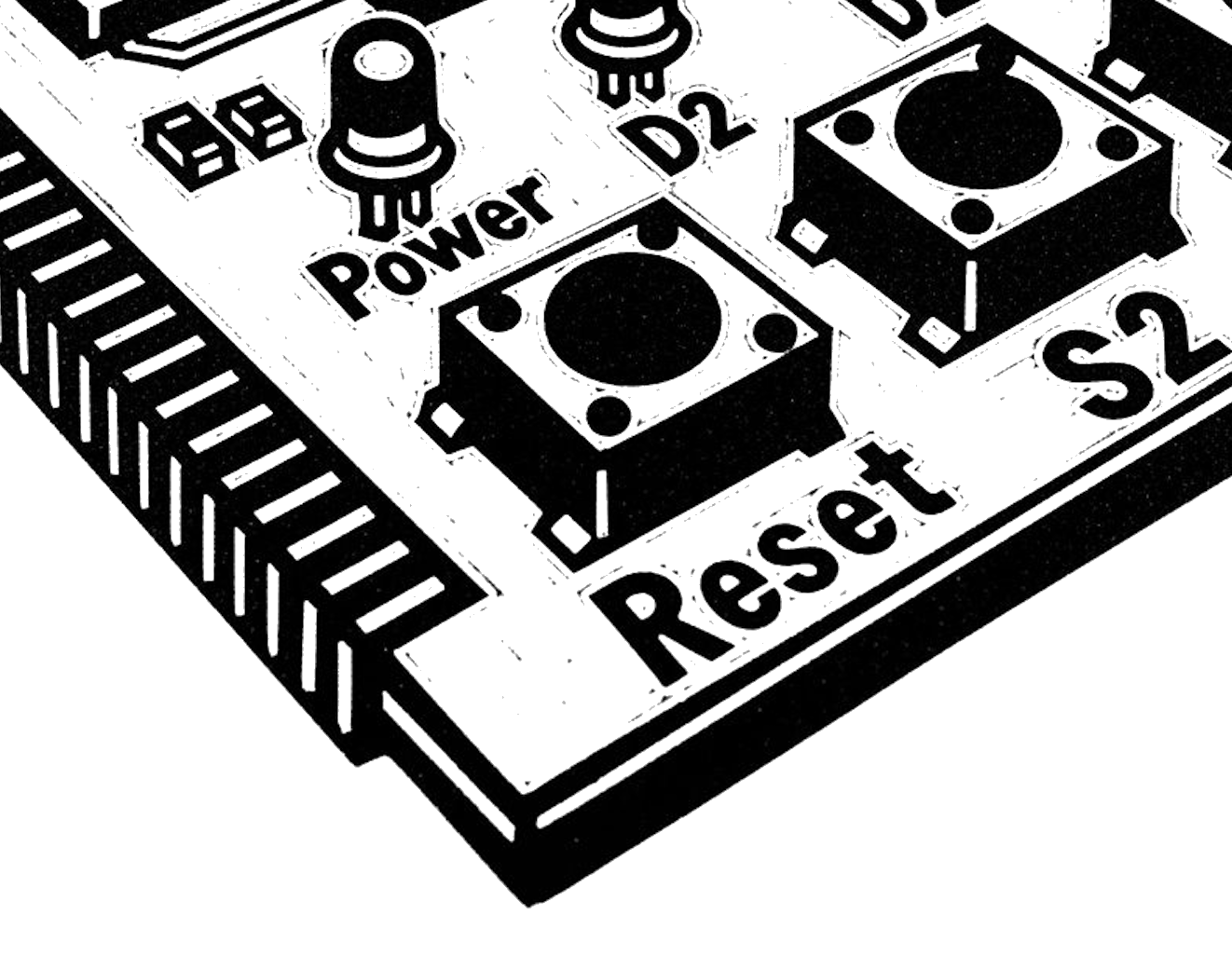
The COR24-TB dev board exposes the CPU’s I/O in a hands-on layout. The S2 button is a user switch—press it and the CPU sees an input event your assembly code can poll or respond to. D2 is a user LED wired to a memory-mapped output address, so your code can toggle it directly with a store instruction. The board breaks out UART connectors for serial communication, with hardware support for an internal interrupt when data arrives—meaning your program doesn’t have to busy-wait on the serial port. Beyond these, the board has six additional GPIO pins intended for a four-wire SPI interface and a two-wire I2C bus. MakerLisp is actively developing bit-bang I2C support (temperature sensor reading is next), followed by an I2C real-time calendar clock, a 4-position 7-segment display via SPI, and SD card access via SPI. A Reset button and Power LED round out the essentials.
The emulator models the S2 button, D2 LED, and UART with interrupt support, so programs written for the browser run the same way on real hardware.
The Browser Emulator
cor24-rs brings COR24 to the web using Rust compiled to WebAssembly. No downloads, no setup—just open the page and start coding.
Features
- Three Tabs - Assembly, C, and Rust pipelines, all running on the same COR24 CPU
- Interactive Assembly Editor - Syntax highlighting, error messages, line numbers
- Step-by-Step Execution - Execute one instruction at a time with log-scale speed control
- Register & Memory Viewer - Watch CPU state change in real-time with highlighted changes
- Instruction Trace - Last 100 executed instructions visible in the web UI
- 11 Assembler Examples - Pre-loaded programs including Blink LED, Fibonacci, Countdown, Variables, and Assert
- 12 Rust Pipeline Demos - From simple add to UART echo with interrupts
- 2 C Pipeline Examples - Fibonacci and Sieve of Eratosthenes via MakerLisp’s CC24 compiler
- Coding Challenges - Test your assembly skills with suggested exercises
- ISA Reference - Complete instruction documentation inline with CPU state, interrupts, and memory map
- Interactive Tutorial - Comprehensive introduction covering registers, instructions, I/O, and idioms
- Self-Test Mode -
?selftestURL parameter runs all 15 examples automatically with pass/fail reporting - Animated Tours -
?showme-asm,?showme-c,?showme-rustwalk through each pipeline - Realistic UART Timing - TX busy for 10 cycles per character; dropped characters when writing without polling
Example: Fibonacci
Here’s a recursive Fibonacci implementation in COR24 assembly:
_fib:
        push    fp              ; Save frame pointer
        push    r2              ; Save r2
        push    r1              ; Save return address
        mov     fp,sp           ; Set up frame
        add     sp,-3           ; Local variable space
        lw      r2,9(fp)        ; Load argument n

        lc      r0,2            ; Load constant 2
        cls     r2,r0           ; Compare n < 2
        brf     L17             ; Branch if false

        lc      r0,1            ; Return 1
        bra     L16             ; Jump to epilogue

L17:
        mov     r0,r2           ; r0 = n
        add     r0,-1           ; r0 = n - 1
        push    r0              ; Push argument
        la      r0,_fib         ; Load fib address
        jal     r1,(r0)         ; Call fib(n-1)
        add     sp,3            ; Clean up argument
        sw      r0,-3(fp)       ; Save result

        mov     r0,r2           ; r0 = n
        add     r0,-2           ; r0 = n - 2
        push    r0              ; Push argument
        la      r0,_fib         ; Load fib address
        jal     r1,(r0)         ; Call fib(n-2)
        add     sp,3            ; Clean up argument
        lw      r1,-3(fp)       ; Load fib(n-1)
        add     r0,r1           ; r0 = fib(n-1) + fib(n-2)

L16:
        mov     sp,fp           ; Restore stack
        pop     r1              ; Restore return address
        pop     r2              ; Restore r2
        pop     fp              ; Restore frame pointer
        jmp     (r1)            ; Return
This demonstrates the full calling convention: prologue/epilogue, argument passing via stack, and recursive calls.
Command Line Tools
Beyond the browser emulator, cor24-rs includes CLI tools for local development:
# Assemble and run in the debugger
cor24-dbg program.s

# Or assemble and run directly
cor24-run program.s

# With LED visualization
cor24-run program.s --leds
The CLI debugger (cor24-dbg) supports breakpoints, step execution, UART I/O, LED/button simulation, and instruction trace. The --uart-never-ready flag forces TX to never clear, useful for testing polling behavior.
Rust to COR24 Pipeline (Experimental)
The project includes experimental support for compiling Rust to COR24:
Rust (.rs) → WASM (.wasm) → COR24 Assembly (.s) → Binary
            ↑               ↑
         rustc          wasm2cor24
        (standard)       (this project)
Write embedded Rust with #![no_std], compile to WebAssembly, then translate to COR24 assembly. The wasm2cor24 translator handles the stack-based IR conversion.
This approach leverages Rust’s existing toolchain—no compiler modifications needed. The wasmparser crate handles WASM parsing, and COR24’s stack-oriented design maps reasonably well from WASM’s stack machine.
Why Learn Assembly?
Even if you never write production assembly, understanding it changes how you think about code:
- Performance intuition - Know what your high-level code compiles to
- Debugging - Read crash dumps and disassembly when things go wrong
- Security - Understand buffer overflows, ROP chains, exploitation
- Embedded systems - Some hardware requires low-level access
- Appreciation - Respect the layers beneath your abstractions
COR24 is simple enough to fit in your head but realistic enough to represent real CPU design patterns. And unlike purely educational architectures, it’s also a practical platform for small embedded problems—the kind of work that used to require an eZ80 or similar microcontroller.
Implementation Details
The emulator core is written in Rust, compiled to WebAssembly via Trunk. Key components:
| Module | Purpose |
|---|---|
cpu/state.rs |
CPU state management (registers, memory, flags) |
cpu/executor.rs |
Instruction execution engine with realistic UART timing |
cpu/decode_rom.rs |
Instruction decode ROM (extracted from hardware Verilog) |
assembler.rs |
Two-pass assembler with as24-compatible syntax enforcement |
challenge.rs |
Coding challenge definitions |
selftest.rs |
Automated test runner for all 15 examples |
app.rs |
Yew-based web application (3 tabs, animated tours) |
The decode ROM is particularly interesting—it’s extracted directly from the hardware Verilog implementation, ensuring the emulator matches the real CPU behavior exactly.
Try It Yourself
Live Demo: sw-embed.github.io/cor24-rs
The demo includes:
- Pre-loaded example programs
- Interactive tutorials
- Coding challenges with automated verification
- Complete ISA reference
Start with the “Hello World” example, then work through the challenges. By the time you complete them, you’ll understand registers, memory, stack operations, and function calls.
Key Takeaways
- COR24 is a real CPU - Designed for FPGAs, runs at 101 MHz, MIT licensed, practical for embedded work
- cor24-rs makes it accessible - Browser-based, no installation required
- Assembly isn’t scary - With good tools, you can see every step
- Rust + WASM works - The entire emulator compiles to a web application
- Simple doesn’t mean toy - COR24’s design prioritizes C compiler compatibility and practical embedded I/O, not just teaching
Resources
- MakerLisp - COR24 creators
- COR24 Soft CPU - FPGA implementation details
- COR24 Dev Board - Hardware development board
- cor24-rs Demo - Live browser emulator
- cor24-rs Source - Full source code
Assembly language is the ground truth. Everything else is abstraction.
Part 2 of the Embedded series. View all parts | Next: Part 3 →
Comments or questions? SW Lab Discord or YouTube @SoftwareWrighter.