Saw (4/?): All Together Now --- Emacs Meets the Multi-Agent Orchestra
1237 words • 7 min read • Abstract
Why Sharpen the Saw? — The name comes from Covey’s Habit 7: stop cutting long enough to sharpen the blade. This series is the weekly checkpoint where I step back from feature work and invest in the tools themselves—smoother editor integration, better agent coordination, less friction between the moving parts. Four weeks in, the compound interest is showing.
| Resource | Link |
|---|---|
| pjmai-rs | sw-cli-tools/pjmai-rs |
| reg-rs | sw-cli-tools/reg-rs |
| All Together Now | sw-vibe-coding/all-together-now |
| Prior Post | Saw (3/?): agentrail-rs — From Walking Skeleton to Dual Memory |
| Comments | Discord |
Emacs Meets the CLI: pjmai-rs
pjmai-rs is a project manager that maintains a stack-based navigation history, groups, and per-project metadata. It works well from the terminal, but Emacs shell-mode has a blind spot: when the CLI changes directories via exit-code signaling, Emacs doesn’t update default-directory. File completion breaks. Dired opens the wrong place.
The new pjmai.el package (376 lines) solves this by calling the binary directly from Elisp and managing per-project shell buffers where default-directory is correct from the start.
What It Does
Everything lives under the C-c p prefix:
| Key | Action |
|---|---|
C-c p c |
Change project (opens/switches shell) |
C-c p l |
List projects |
C-c p s |
Show current project |
C-c p p |
Push to stack and switch |
C-c p o |
Pop from stack |
C-c p d |
Open project in dired |
C-c p a |
Add project |
C-c p e |
Edit project metadata |
C-c p g |
Group commands (list, show, prompt) |
Each project gets a dedicated shell buffer (*pjmai:projectname*) with the correct working directory set before the shell spawns. Tab completion just works. The shell function is pluggable—#'shell by default, but #'vterm or #'eshell are configurable.
25 ERT tests cover the CLI interface, JSON parsing, project completion, shell buffer management, and keymap structure.
Emacs Meets the CLI: reg-rs
reg-rs is a regression testing tool that captures command output and diffs against baselines. Like pjmai-rs, it had great terminal ergonomics but required context-switching away from Emacs.
my-reg-rs.el (208 lines) puts regression testing under C-c r:
| Key | Action |
|---|---|
C-c r r |
Run all tests |
C-c r v |
Run verbose |
C-c r l |
List tests |
C-c r s |
Show test details |
C-c r u |
Update/accept baselines |
C-c r a |
Add new test |
C-c r R |
Rerun last command |
Output goes to compilation-mode buffers, so next-error navigation works naturally. The package auto-detects the project root by checking for work/reg-rs/, .rgt/.tdb files, or falling back to project.el.
All Together Now: A Multi-Agent Program Manager
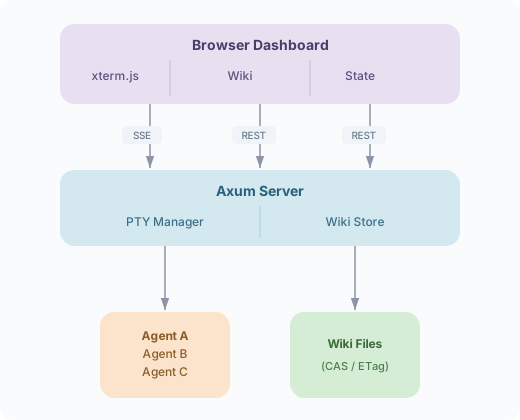
The bigger project this week. I’ve been running multiple Claude Code instances across repos and the coordination overhead was becoming the bottleneck—switching tabs, manually checking wikis, copying context between agents. All Together Now (ATN) is a Program Manager that owns the agent terminals and provides a unified control plane.
The Architecture
ATN runs as an Axum HTTP server that spawns N agents via portable-pty, streams their terminal output through SSE to a browser dashboard, and maintains a shared wiki for coordination state.
Four Phases in One Session
| Phase | What | Tests |
|---|---|---|
| 0+1 | PTY session management—spawn, read/write, Ctrl-C, transcripts | 5 integration tests |
| 2 | Minimal web UI—SSE streaming, xterm.js terminal widget | Working end-to-end |
| 3 | Multi-agent dashboard—N agents, per-agent state machine, responsive grid | 3-agent demo (alice, bob, carol) |
| 4 | Wiki integration—REST CRUD, ETag-based CAS, seeded coordination pages | 8 unit tests |
29 tests pass across the workspace. Zero clippy warnings.
The Six Crates
| Crate | Lines | Role |
|---|---|---|
atn-core |
~300 | Domain types: AgentConfig, AgentState, events, routing |
atn-pty |
~500 | PTY sessions, serialized writer queues, state tracker |
atn-server |
~270 | Axum HTTP/SSE server, static UI |
atn-ui |
~200 | Yew WASM components (dashboard, wiki browser) |
atn-wiki |
~300 | File-backed wiki with CAS from wiki-rs |
atn-trail |
~200 | Agentrail integration for workflow tracking |
Why PTY Ownership Matters
The key insight: if the Program Manager owns the pseudo-terminals, it can:
- Stream output to a web dashboard without agents knowing
- Inject commands into agent sessions (serialized, no interleaving)
- Detect state by parsing output (prompt markers, idle timeouts, question detection)
- Log transcripts for debugging and replay
The serialized writer queue per agent prevents input corruption when multiple sources (human, coordinator, macros) write to the same terminal.
Wiki as Coordination Layer
ATN seeds five coordination pages on startup:
| Page | Purpose |
|---|---|
Coordination/Goals |
Team objectives |
Coordination/Agents |
Who is doing what (auto-updated) |
Coordination/Requests |
Inter-agent feature/bug requests |
Coordination/Blockers |
Dependency tracking |
Coordination/Log |
Append-only event timeline |
The wiki uses ETag-based Compare-and-Swap from the wiki-rs project, so concurrent agent writes get conflict detection instead of silent data loss.
What’s Next
ATN Phase 5: Message routing—agents write JSON to an outbox, the PGM routes push events to the correct target agent or escalates to human review.
Emacs packages: Phase 2 additions—transient menus for discoverability, completion annotations showing project paths and languages.
Emacs as ATN frontend: The pjmai-rs and reg-rs Emacs packages prove the pattern—call a Rust binary from Elisp, parse structured output, manage buffers. The same approach will give Emacs users a native ATN interface: agent status, wiki edits, and command injection without leaving the editor.
Tying it together: ATN + agentrail-rs integration, where each agent’s workflow progress is visible in the dashboard (and eventually in Emacs) and skills/experiences flow between sessions.
Better tools, better integration. Follow for more Sharpen the Saw updates.
Part 4 of the Sharpen the Saw Sundays series. View all parts
Comments or questions? SW Lab Discord or YouTube @SoftwareWrighter.