
TBT (5/?): IBM 1130 System Emulator - Experience 1960s Computing
1231 words • 7 min read • Abstract
| Resource | Link |
|---|---|
| Live Demo | IBM 1130 System Emulator |
| Source | GitHub |
| Video | IBM 1130 System Emulator |
| IBM Docs | Functional Characteristics (GA26-5881) |
| More Docs | Bitsavers IBM 1130 Collection |
The System
This isn’t just an assembly emulator—it’s a full system visualization:
| Component | What It Does |
|---|---|
| Console Panel | Authentic indicator lights, toggle switches, speed control |
| Assembler Game | Write and execute IBM 1130 code with real-time visualization |
| Keypunch | IBM 029 text cards and 1442 object deck visualization |
| Printer | IBM 1131 console printer with greenbar paper |
Console Panel
The console panel recreates the physical operator interface with all indicator light groups documented in IBM’s Functional Characteristics manual.
Register Display (6 rows × 16 positions)
| Row | Register | Bits Shown | Purpose |
|---|---|---|---|
| 1 | IAR | 15 | Instruction Address Register (program counter) |
| 2 | SAR | 15 | Storage Address Register (memory access) |
| 3 | SBR | 16 | Storage Buffer Register (data word) |
| 4 | AFR | 16 | Arithmetic Factor Register (operand) |
| 5 | ACC | 16 | Accumulator (main arithmetic register) |
| 6 | EXT | 16 | Extension (double-precision, multiply/divide) |
Right-Side Indicators
Beyond the register displays, the console shows:
- Operation Register (5 bits) - Binary op-code of current instruction
- Format/Tag Indicators - Long instruction format, index register selection
- Cycle Control (T0-T7) - Internal timing pulses for debugging
- Status Lights - Wait, Run, Fetch, Execute, Indirect Address
Control Panel Lights
| Light | Purpose |
|---|---|
| DISK UNLOCK | Safe to swap 2315 disk cartridge |
| FILE READY | Disk drive up to speed |
| FORMS CHECK | Printer out of paper |
| RUN | CPU executing instructions |
| PARITY | Memory parity error |
| FREEZE | Fatal hardware error |
Operator Controls
- 16-bit toggle switches for manual data entry
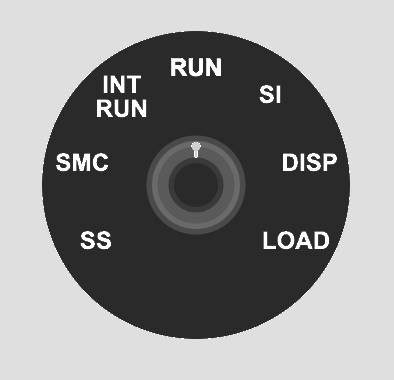
- 7-position speed knob - Single Step, SMC, INT RUN, RUN, SI, DISP, LOAD
- Lamp test to verify all indicators function
- Emergency stop button
Assembler Game
Learn the IBM 1130 instruction set interactively:
- Complete instruction set - LD, STO, LDX, STX, A, S, AND, OR, SLA, SRA, BSC, BSI, WAIT
- Memory-mapped index registers - XR1-3 at addresses 1, 2, 3 (historically accurate)
- Step-by-step execution with change highlighting
- Interactive examples covering arithmetic, indexing, shifts
- Progressive challenges with validation
Keypunch
The keypunch simulation supports two card types:
IBM 029 Text Cards
- Hollerith encoding - Standard character-to-punch mapping
- Visual card display - Watch holes appear as you type
- Multi-card decks - Manage multiple cards
IBM 1130 Object Deck (1442 Output)
- Binary card visualization - Machine code punch patterns
- Object deck format - Matches authentic assembler output
- No character printing - Pure binary data cards
The IBM 029 Keypunch produced human-readable text cards. For binary object decks (compiled programs), the IBM 1442 Card Read-Punch would create cards with arbitrary punch patterns that don’t map to characters.
Printer
The IBM 1131 Console Printer simulation:
- Greenbar paper rendering - Authentic line printer output
- Typewriter-style characters - Period-appropriate appearance
- Console output - System messages and program output
Technology
| Component | Choice |
|---|---|
| Language | Rust |
| Target | WebAssembly |
| UI Framework | Yew |
| Build Tool | Trunk |
| Hosting | GitHub Pages |
Planned Enhancements
This is a work in progress. Planned features include:
- Additional challenges (10 total)
- Code save/load functionality
- URL sharing of programs
- Breakpoints and memory watches
- Keyboard shortcuts
- Full 1442 Card Read-Punch integration
IBM Documentation References
| Document | Description |
|---|---|
| GA26-5881 | Functional Characteristics - Console panel details |
| GA26-5717 | Operating Procedures - Operator instructions |
| GA26-5914 | Physical Planning - System dimensions |
| Bitsavers Collection | Complete IBM 1130 documentation archive |
Project Goals
This is an early proof-of-concept for trying out components that could be extended to produce a more realistic system of devices that could actually run programs. The modular architecture allows each peripheral (console, keypunch, printer) to be developed and refined independently.
A key goal is educational challenges that teach assembly language step by step. The assembler game provides progressive exercises that build understanding from basic load/store operations through arithmetic, indexing, and control flow.
Historical Significance
The IBM 1130 was the first computer for many programmers in the late 1960s and 1970s. Its clean architecture and accessible price point (~$32,000) made it ideal for education.
A Transitional Technology
The IBM 1130 arrived after mechanical calculators and vacuum tube computers, but before dense integrated circuits and microprocessors. This was a unique moment in computing history when machines were complex enough to be powerful, yet simple enough to be fully understood by one person.
The system shipped with complete schematics and diagnostic listings. A field engineer could use an oscilloscope to probe the pins on every transistor. The “integrated circuit” of the era was a small can with a 4×4 pin grid containing just two transistors, mounted on a pluggable card connected via a wire-wrapped backplane. When something failed, you could see it, touch it, and replace it.
Non-Volatile Core Memory
One remarkable feature: magnetic core memory was non-volatile. You could stop the system, power down overnight, come back in the morning, power up, and start your program exactly where it left off—without reloading from cards, tape, or disk.
Each bit was stored as the magnetic polarity of a tiny ferrite ring. No electricity required to maintain state. This made the 1130 remarkably resilient and practical for environments where power wasn’t guaranteed.
Notable fact: The Forth programming language was developed on the IBM 1130 by Charles Moore in the late 1960s.
Personal Experience
In the late 1970s, I worked as an IBM Customer Engineer maintaining a large number of IBM 1130 and 1800 systems used primarily by IBM manufacturing facilities in Kingston, Poughkeepsie, and East Fishkill, New York.
Field service on these machines was hands-on in ways that seem almost unimaginable today. I would often hand-assemble code on paper, converting mnemonics to binary, then enter machine code via the console toggle switches to create a small program. That program’s job? To punch another program onto a card.
I could then insert that punched card into a diagnostic deck to loop on an error condition while I used an oscilloscope and logic schematics to diagnose a failing circuit card. The blinking lights weren’t decoration—they were essential debugging tools that showed exactly what the CPU was doing at each moment.
This emulator recreates that experience: the same indicator lights, the same toggle switches, the same intimate connection between human and machine that made these systems so memorable to work with.
Experience 1960s computing in your browser. Work in progress.
Part 5 of the Throwback Thursday series. View all parts