
TBT (3/?): Vector Graphics Games
1633 words • 9 min read • Abstract
Before pixels, there were vectors. This Throwback Thursday explores the evolution of vector graphics gaming—from military radar displays to arcade classics—and my attempt to recreate them in Rust and WebAssembly.
| Resource | Link |
|---|---|
| Live Demo | Play in Browser |
| Video | TBT Vector Graphics Games |
| Games | vectorcade-games |
| Shared | vectorcade-shared |
| Fonts | vectorcade-fonts |
| Renderer | vectorcade-render-wgpu |
| Web | vectorcade-web-yew |
My First Vector Display: The IBM 2250
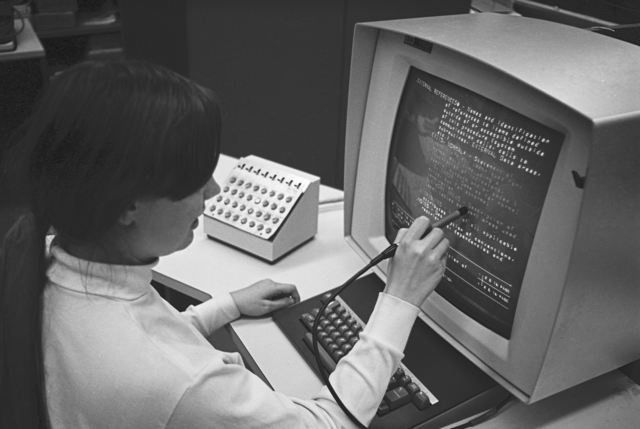
My first encounter with vector graphics was an IBM 2250 Graphics Display Unit—introduced in 1964, costing around $280,000 in period dollars. It connected to an IBM 1130 that acted as a graphics controller for an IBM S/370 mainframe where the graphical applications ran. At that price, nobody was playing games on it—Computer Aided Design was the killer app.
The 2250’s specifications were impressive for its era:
| Specification | Value |
|---|---|
| Display | 21-inch P39 phosphor CRT |
| Resolution | 1024 × 1024 addressable points |
| Usable area | 12” × 12” (square aspect) |
| Refresh rate | ~40 frames/second |
| Input | Light pen for direct interaction |
| Vector drawing | Hardware character generator optional |
The CRT drew lines by steering an electron beam directly—no pixel grid, no rasterization. Just pure geometry traced in phosphor glow. The green P39 phosphor had long persistence, reducing flicker but creating ghostly trails on moving objects.
The light pen was revolutionary: you could point directly at displayed geometry and the system knew which vector you were touching. Interactive graphics in 1964.
The Arcade Era
Vector displays found their way into arcades, where they defined a visual style that’s still recognizable today:
| Game | Year | Innovation |
|---|---|---|
| Lunar Lander | 1979 | Physics simulation, thrust/gravity |
| Asteroids | 1979 | Wrap-around space, particle effects |
| BattleZone | 1980 | Green wireframe 3D, first-person tanks |
| Tempest | 1981 | Multi-colored vectors, pseudo-3D depth |
(Note: Pong (1972) was actually a raster game using discrete logic, but its simple geometry makes it a natural fit for vector recreation.)
Each generation built on the last. White vectors on black screens gave way to green wireframes, then full color. The hardware pushed boundaries that feel primitive now but were revolutionary then.
The Vectorcade Project
Vectorcade recreates these mechanics using modern tools:
- Rust for game logic and rendering
- WebAssembly for browser deployment
- wgpu for GPU-accelerated vector rendering
- Yew for the web frontend
Multi-Repo Architecture
The project architecture emerged from a design session with ChatGPT, exploring how to structure a multi-agent development workflow. The result: a DAG of repositories, each with clear ownership boundaries:
vectorcade-shared/      (Pure Rust API contracts)
    ↓
vectorcade-fonts/       (Vector font styles)
    ↓
vectorcade-games/       (Game logic: Pong, Asteroids, etc.)
    ↓
vectorcade-render-wgpu/ (wgpu + lyon tessellation)
    ↓
vectorcade-web-yew/     (Yew web shell)
This DAG structure allows parallel development with assigned agent roles:
| Agent | Repo | Focus |
|---|---|---|
| A | vectorcade-shared | Core API steward: minimal, stable, pure |
| B | vectorcade-fonts | Font stylist: 3-5 distinct vector styles |
| C | vectorcade-games | Game logic: Pong → Asteroids → Lunar Lander |
| D | vectorcade-render-wgpu | Renderer: lyon tessellation → wgpu triangles |
| E | vectorcade-web-yew | Integrator: UI, mobile controls, PWA |
Each agent works against stable interfaces—the DrawCmd display list and Game trait—so they don’t step on each other.
The Display List Model
Games don’t render directly. They emit draw commands that the renderer interprets:
pub enum DrawCmd {
    Clear { color: Rgba },
    Line(Line2),
    Polyline { pts: Vec<[f32;2]>, closed: bool, stroke: Stroke },
    Text { pos: [f32;2], s: String, size_px: f32, color: Rgba },
    PushTransform(Transform2),
    PopTransform,
}
This keeps game logic portable. The same Asteroids code can render through wgpu on desktop, WebGPU in browsers, or even a software rasterizer.
Vector Fonts
Classic arcade games had distinctive lettering. Vectorcade includes multiple font styles to match:
| Style | Look | Games |
|---|---|---|
ATARI |
Boxy, utilitarian | Asteroids, Lunar Lander |
CINEMATRONICS |
Thin, angular | Star Castle |
MIDWAY |
Slightly rounded | Defender |
VECTOR_SCANLINE |
Broken segments | “Beam jitter” effect |
Each font is pure vector geometry—no bitmaps, no texture atlases.
3D Projection
BattleZone and Tempest need 3D-to-2D projection. Instead of a full 3D renderer, Vectorcade uses a “2.5D pipeline”:
pub struct Camera3 {
    pub pos: [f32;3],
    pub yaw: f32,
    pub pitch: f32,
    pub fov_y_rad: f32,
}

pub fn project_polyline(cam: &Camera3, pts3: &[[f32;3]]) -> Vec<[f32;2]>;
Games maintain 3D geometry; the core projects it to 2D lines. Depth-based brightness gives the classic “farther = dimmer” effect.
Why Rust + WASM?
The combination solves several problems:
- Performance: Games need consistent frame rates; Rust delivers
- Portability: Same code runs native and in browsers
- Safety: No dangling pointers in the game loop
- Modern tooling: Cargo, wasm-pack, Trunk make deployment straightforward
The wgpu + lyon stack provides cross-platform GPU rendering with proper thick-line support (WebGL’s lineWidth is notoriously inconsistent).
Current Status
| Component | Status |
|---|---|
| vectorcade-shared | Functional |
| vectorcade-fonts | Functional |
| vectorcade-games | Playable (5 demos) |
| vectorcade-render-wgpu | Functional |
| vectorcade-web-yew | Functional |
The core architecture works. All five demos are playable in the browser. Polish and audio remain.
The Demos
The video showcases five demonstrations, progressing from static display to full gameplay:
1. IBM 2250 Chessboard
A static image rendered in the style of the original IBM 2250. The 2250 was mainly used for Computer Aided Design, but programmers did create games on it—this chessboard pays tribute to that era.
2. Pong (Playable)
A vector implementation of the classic. The original Pong (1972) wasn’t actually a vector game—it used discrete logic and a raster display—but some clones used vector hardware. This recreation captures the pure-geometry aesthetic.
3. Asteroids (Playable)
One of the most popular vector arcade games. Rotate, thrust, and shoot to survive. The ship and asteroids wrap around screen edges, creating the classic “infinite space” feel.
4. BattleZone (Playable)
Green wireframe 3D tanks. Drive through a battlefield, shooting enemies and dodging missiles. One of the first games with true 3D perspective—rendered entirely with vectors.
5. Tempest (Playable)
The pinnacle of vector arcade hardware. Move around the edge of geometric tubes, shooting enemies that climb up from the depths. Each level changes the tube shape and color scheme.
Implementation
Each game implements the same Game trait:
pub trait Game {
    fn metadata(&self) -> GameMeta;
    fn reset(&mut self, ctx: &mut GameCtx);
    fn update(&mut self, ctx: &mut GameCtx, dt: f32);
    fn render(&mut self, ctx: &mut GameCtx, out: &mut Vec<DrawCmd>);
}
This makes games drop-in replaceable in the web shell—no renderer changes needed.
TODO
The demos are playable but not finished. Remaining work:
GPU rendering: Switch from Canvas 2D emulation to actual wgpu GPU rendering[Ed. Completed 2/13]- Music and sound effects: Authentic arcade audio
- More aggressive opponents: AI improvements for challenge
- Additional levels/difficulties: Progression and replay value
- More animations: Explosions, transitions, effects
Resources
Before pixels, there were vectors. Vectorcade brings them back—in Rust, for the browser, with phosphor glow optional.
Credits
| Role | Credit |
|---|---|
| Director | Mike Wright |
| Research & Architecture | ChatGPT |
| vectorcade-shared | Claude Code CLI agent |
| vectorcade-fonts | Claude Code CLI agent |
| vectorcade-games | Claude Code CLI agent |
| vectorcade-render-wgpu | Claude Code CLI agent |
| vectorcade-web-yew | Claude Code CLI agent |
| Explainer Video | Claude Code |
| Blog Post | Claude Code |
Timeline: First pass vibe coded in one day (February 12, 2026)
- First commit: 11:08 AM PST
- Last commit: 5:08 PM PST
- Total commits: 52 across 4 repositories
- WGPU support added February 13, 2026
References
IBM 2250 Photo: “HES IBM 2250 Console grlloyd Oct1969” by Gregory Lloyd, October 1969. Brown University Hypertext Editing System (HES) demonstration. Licensed under CC BY-SA 4.0. Used with attribution.

Part 3 of the Throwback Thursday series. View all parts | Next: Part 4 →